· 13 min read
Novelcrafter Review: Pricing, Features, Writing Quality & Quick Verdict
Our hands-on Novelcrafter review covers pricing, the Codex memory system, AI flexibility, and real user feedback.
Is Novelcrafter Worth It?
Novelcrafter is a web-based AI writing platform designed for fiction authors who want deep control over their storytelling process. It combines structured planning tools with flexible AI integration through a Bring Your Own Key (BYOK) system. This means you can connect your own AI provider rather than relying on the built-in AI. Ultimately, this gives you more control over cost, model choice, and the output quality of your story.
Overall, the platform is powerful and highly customizable, especially for complex world-building. However, from our experience, the technical setup and the steep learning curve can feel overwhelming for beginners, especially if all you need is a simple AI writing tool.
- Best for: Writers who want full control over AI models, prompts, and long-form storytelling with complex world-building.
- Not ideal for: Non-technical users or writers who want a simple AI writing tool.
- Standout strength: The Codex feature acts as a personal Wikipedia where users can keep track of all their characters, world-building, and plot points.
- Main tradeoff: A very steep learning curve and a complex interface that can feel overwhelming for beginners or those who prefer a simpler platform for AI writing.
At a Glance
Free tier | No free tier, but a 21-day free trial is available |
Premium tiers | Range from $4-$20/month (see Pricing section for more) |
Platforms | Web-only |
Community | Discord (~9,600 members) and X (Twitter) (~480 followers) |
NSFW | Novelcrafter offers NSFW writing but the effectiveness depends on the AI model the user chooses |
What Is Novelcrafter?
Novelcrafter is an AI platform designed as a writing partner to help users brainstorm, outline, write, and edit their stories. The platform allows users to integrate their own AI models and use them when chatting with characters, getting feedback on plot points, and generating storylines.
From a user’s perspective, this flexibility is really powerful, but it also means you might spend more time setting up the system before you actually start writing.
The platform was developed by Novelcrafter UG, an independent software company founded in 2023.
Our Writing Experience With Novelcrafter
To get a feel for how Novelcrafter works, we spent about four hours testing the platform and created an original story called The Rotting Mirror.
The story is set around a cursed royal mirror that starts to decay and slowly distorts everything it reflects. As its power spreads, people in the kingdom start losing their minds and turn against one another. Fathers betray their sons, mothers their daughters.
Turns out that the only way to defeat the mirror is through a royal sacrifice. The king has to give up his firstborn son to become the living anchor that binds the mirror’s curse, trapping its power.
We chose this story because we wanted to see how the platform handles original story ideas, especially darker themes.
During the test, we focused on:
- How easy it is to start a new story using Novelcrafter
- The Codex setup and how it stores world-building details
- Scene generation using the Scene Beat feature
- Overall writing quality and tone
- Consistency of tone and writing style across AI-generated outputs
Our Custom Story: The Rotting Mirror
As mentioned, we used a custom story, The Rotting Mirror, as our project to test Novelcrafter and its features.
In the next sections, we’ll take a dive into the main features of Novelcrafter and how they helped us shape and develop The Rotting Mirror.
The Codex
One of the first features that we explored was the Codex. The Codex acts as Novelcrafter’s main memory hub for world-building tools. It’s where you store all your important story information, including the characters, locations, objects and items, lore, and subplots of your world. The AI then uses this information when creating everything from full scenes to beat-by-beat dialogue.
.webp?prefix=blog_post_media)
We used the Codex to build key elements of our story, The Rotting Mirror, including:
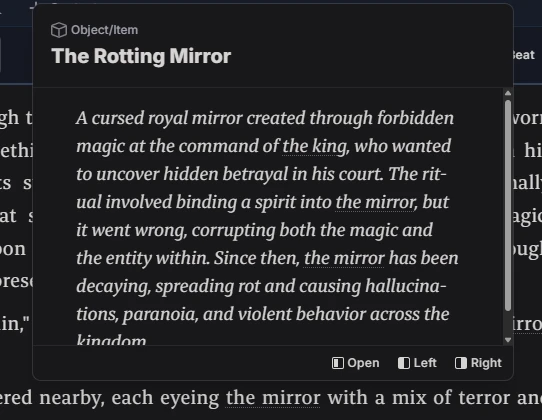
- The cursed royal mirror and its origin. It was created through forbidden magic at the command of the king, who wanted to uncover hidden betrayal in his court.
- The failed ritual used to bind a spirit into the mirror, which instead corrupted both the magic and the mirror
- The mirror’s ongoing decay over time, as its power continues to rot and spread
- How the mirror distorts reality and causes hallucinations, paranoia, and violent behavior across the kingdom
.webp?prefix=blog_post_media)
We immediately noticed that whenever we mentioned the mirror, the Codex would pop up and display the information that we had previously stored.
AI Integration and Writing Quality
After setting up our Codex, it was time actually to start writing. We kicked off the story with a few paragraphs to set the scene before comparing the generated writing quality.
To use the AI, you type “/” and select continue writing, which then opens a pop-up where you choose your AI connection.
We decided to go with the recommended option and chose OpenRouter, which is marketed as a one-stop shop for accessing multiple models, including both proprietary and NSFW-friendly models.
.webp?prefix=blog_post_media)
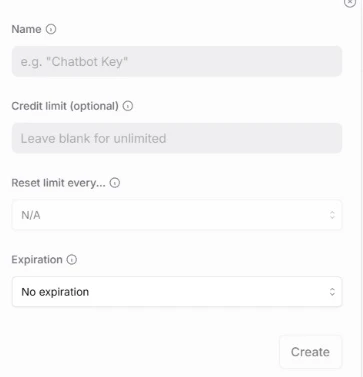
From there, we had to create an OpenRouter account and generate an API key. During this process, you can customize things like the key name, credit limit, reset time, and expiration time.
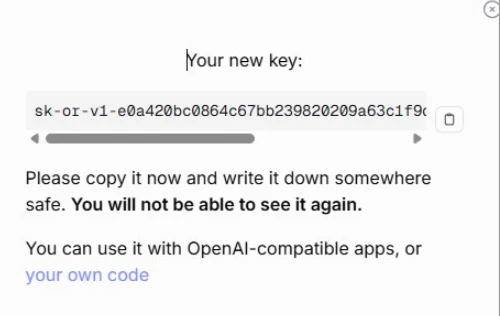
Once that’s done, you’re given your API key, which you’ll use to connect to Novelcrafter. You can keep it somewhere safe for future reference.
After connecting everything, we bought some credits from OpenRouter and used the Scene Beat feature to generate AI text and continue our story. At this stage, the writing experience became more enjoyable for us because the setup was finally complete, and we could focus on creating our story instead of configuration.
We were pleasantly surprised to see the AI pick up the tone well and lean into the dark tone that fit our story. The descriptions were vivid and had strong imagery that helped bring the scene to life. The king’s dialogue was also authoritative, with a delightfully subtle hint of paranoia to add to the tension.
.webp?prefix=blog_post_media)
However, we quickly noticed that the writing felt slightly overwritten, with heavy, dramatic descriptions that were too close to each other. We also noticed that there isn’t a direct way to fine-tune the text through prompting. The only available options are Expand, Rephrase, and Shorten, along with manually editing the text. Because of this, we had to revise the output ourselves to make the writing feel more natural.
Structuring Our Story
After writing our first chapter, we moved on to test Novelcrafter’s planning system. While some writers prefer to 'pants' their way through a story — diving straight into the prose without a plan — for those who struggle with organizing scenes or maintaining a smooth story flow, this is where the platform really shines.
Instead of a storyboard tool, Novelcrafter uses the Plan tab with a grid view, where each card represents a chapter and its summary. You can easily rearrange the order of your acts, chapters, and scenes. Although this is the main way of laying out your story, there are two other ways to view it:
- The Matrix View: This format shows your story in a more structured layout. At the top, it also shows which Codex entries appear in which scenes
- The Outline View: Unlike the visual cards that you see on the Grid, the Outline view shows a single-page in a simple top-to-bottom format. This makes it easy to follow your story in a linear flow.
We decided to stick to the Grid view and used it to break our story into clear sections and map out the overall plot. We also added key plot points into each chapter to guide the story and turn our idea into a more structured outline.
The plan tab is designed to give a high-level overview of your story as it focuses on chapters rather than detailed scenes. This is important for writers because it helps you see the bigger picture of your story and ensures your plot flows from one chapter to the next. You can also use the “+ New Scene” option under each chapter to build out your scenes.
.webp?prefix=blog_post_media)
UX Controls and Features
Novelcrafter offers users several UX features that support fiction and creative writing. Within the platform, you can:
- Expand any part of the AI’s writing
- Rephrase the AI-generated text
- Shorten the AI’s text
.webp?prefix=blog_post_media)
Lastly, if you get easily distracted and have a hard time focusing on your story, you can minimize distractions by hiding side panels and focusing only on the editor.
Although these tools are quite helpful, we quickly noted that there isn’t a direct way to tell the AI exactly what you want through prompting. The AI just continues your story based on what it thinks fits. This means that if the AI steers away from your story or writing style, you’ll need to manually edit it. Like mentioned earlier, our initial output felt too dramatic, we had to tone it down and manually edit the story.
Trust, Privacy, and Data
Novelcrafter’s privacy policy states that the platform may collect basic user data required to operate the platform, such as account details and usage statistics.
The privacy policy also states that the platform may share users' data with third-party services that facilitate their operations, such as AWS, Zapier, and Slack.
It further states that Novelcrafter doesn’t sell, trade, or rent out personal user data to third parties for their marketing purpose and the platform doesn’t use the content created by users to train any artificial intelligence or machine learning models.
Users can delete their accounts and data at any time. As of April 13th, 2026, there are no publicly reported data breaches associated with Novelcrafter.
Pricing
Free Tier:
- Not included. However, new users get access to a 21-day free trial, where they can explore the platform and connect to free AI models on OpenRouter.
Paid Plans:
- Scribe: $4/month (paid monthly) or $40/month (paid annually) — This plan includes all writing features, unlimited books and series, and basic review features. Users in this plan can’t use the Bring Your Own Key feature and can only use the platform for manual writing and organization.
- Hobbyist: $8/month (paid monthly) or $80/month (paid annually) — This plan includes everything in the Scribe plan, plus the ability to connect your own AI key and access features like AI brainstorming and custom Blueprints where they can write prompts to define exactly how the AI should behave. This includes the prose style and point of view, and even how the AI handles dialogue or scene transitions.
- Artisan $14/month (paid monthly) or $140/month (paid annually) — This plan includes everything in the Hobbyist plan and advanced chat and review features.
- Specialist: $20/month (paid monthly) or $200/month (paid annually) — This plan includes everything in the Artisan plan plus team management features. This means that several users can work within the same story universe and the same Codex.
.webp?prefix=blog_post_media)
One important thing to note is that the subscription does not include AI usage costs. Novelcrafter only covers access to the platform and its features, but you still need to connect your own AI provider through an API key.
.webp?prefix=blog_post_media)
This means that every time you use AI to generate a part of your story, it’s billed separately by the AI provider. In other words, your total monthly costs are your Novelcrafter subscription plus your AI usage costs, depending on the provider you choose.
User Sentiment
Novelcrafter has a growing community on Discord with about 9,600+ members, but it does not have a dedicated subreddit.
Many users in the community praise the platform for its clean and intuitive interface and the Codex that works well for AI interaction.
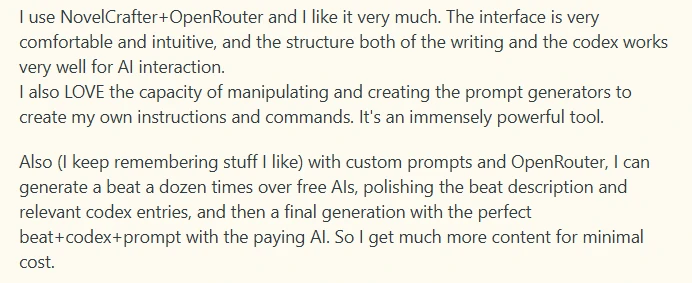
However, as we reviewed sentiments around Novelcrafter, we found that the steep learning curve for the BYOK system was a common complaint. Many users felt that connecting AI keys from providers, tokens, and choosing an AI model required them to have advanced technical experience. Some even mentioned that they felt like they had to be AI gurus to get started, and this led to them leaving the platform.

Users also complained that the platform restricted their creative freedom. They said they didn’t like not having full control over what goes into the prompt, since different scenes require different Codex information. Because the AI relies on summaries, it often has to keep going back and editing those summaries for each scene. Instead of focusing on writing, they felt like they were spending more time adjusting settings and fine-tuning the system.
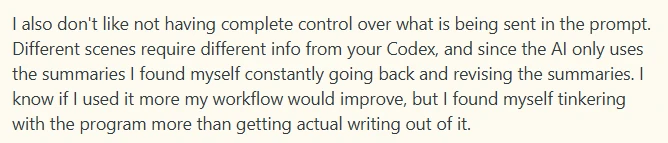
After reviewing the platform and facing the same issues that users complained about, Novelcrafter feels more suited for technical writers who don't mind complex systems. The platform may not be a great fit for beginners or free-spirited writers who prefer a simple, flexible, and less restrictive writing experience.
Pros and Cons
Pros
- The Codex feature that users can use to track their characters, and also add lore and locations
- AI flexibility. Users get full control over the AI models and prompts
- You can import or export your novel in formats like Word, Markdown, HTML, EPUB, PDF, and DOCX.
- Collaboration features in tiers like Specialist allow you to work on your book with other co-authors
- The platform supports image generation via external AI models like DALL-E, which helps writers visualize their stories.
- The Blueprints feature gives you control over the dialogue style and key details of your story.
Cons
- No free tier available
- Unpredictable pricing. Although there is a set base subscription for the 3 tiers, how much money you use depends on the AI models you choose, making the pricing unpredictable.
- Limited creative flexibility. Some of the tools, like the Story Board, favor structured planning and can frustrate users who want complete creative freedom.
- The API key requirement makes it difficult for non-technical users to navigate the platform.
- The platform has repetitive AI suggestions that lack originality and don’t match the user’s writing voice and tone.
Alternatives
If Novelcrafter’s API Key requirements and limited creative freedom are dealbreakers for you, here are three alternatives that you can consider:
- Sudowrite: Sudowrite is the best alternative for writers who want to draft their novels and stories with AI. It has features like Brainstorm, Brain Dump, and Synopsis Generation that help writers generate ideas quickly and draft full scenes.
- Scrivener: Scrivener is the best alternative for seasoned writers who love structure and organization. It has features like a Binder, Corkboard, and Compile tool, where you can easily plan and structure your novel.
- DreamGen: DreamGen is the best alternative for writers who want a free tier and complete creative freedom. It has features like real-time story steering and multi-character role-play that allow you to control dialogue, plot direction, and character interactions in real time.
FAQ
Is Novelcrafter free?
No, Novelcrafter doesn’t have a free plan for users.
- Novelcrafter does offer a 21-day free trial for users, where you can test the platform before committing.
- You don’t need a credit card to access the trial.
- After the trial, you’ll need to pick a paid plan if you want to continue using the platform.
How much is Novelcrafter?
Novelcrafter offers four paid plans that are designed for different types of writers:
- Scribe ($4/month): This plan is for writers who only need manual writing and organization tools. Scribe does not include AI features.
- Hobbyist ($8/month): This plan includes AI integration via the Bring Your Own Key system, where you can access features like Scene Generation and custom Blueprints for controlling the writing style and structure.
- Artisan ($14/month): This plan includes AI integration plus advanced review tools for editing and getting feedback on your story.
- Specialist ($20/month): This plan is designed for collaboration, enabling multiple users to work together within the same story universe and Codex with team management features.
All the plans include unlimited books and series and access to the Codex, but if you want to write your book with AI, then you can start with Hobbyist or Artisan.
Does Novelcrafter include AI, or do I pay separately?
No, your Novelcrafter subscription only pays for access to the platform and the features included in each plan.
- You need to connect your own AI key.
- When you generate text, the requests are billed by the AI provider and not by Novelcrafter.
- Your total monthly cost will be your Novelcrafter plan plus your AI tokens, depending on the provider that you choose.
Does Novelcrafter allow NSFW content?
Yes, Novelcrafter allows NSFW writing, and it doesn’t apply any content filters to your story.
- The content restrictions depend on the AI model that you choose
- Models like Claude are more restrictive towards NSFW content
- If you want fewer restrictions on your writing, you can choose an unfiltered and less restrictive model
How We Tested
- Test date: 2026-04-09
- Plan tested: Scribe plan $4/month
We tested Novelcrafter for about four hours, where we:
- Created one custom story (The Rotting Mirror)
- Reviewed character creation tools using the Codex
- Reviewed 50+ Reddit threads
- Reviewed the privacy policy documentation
Note: We did not test the Hobbyist plan ($8/month), Artisan plan ($14/month), and Specialist plan ($20/month)
Last tested: April 17, 2026.