· 18 min read
AI Dungeon Review: Features, Pricing & Verdict
We spent 12 hours testing the AI Dungeon platform by Latitude. Read this review to learn about its features, pros & cons, and pricing.
Quick Verdict
AI Dungeon is a second-person roleplaying platform with deep, detailed scenario management. Developed by Latitude after a successful game jam, AI Dungeon is rich in customization options. AI Dungeon is great at scenario management, and highly rewarding when its features are learned, but can take some getting used to when starting out.
- Best for: Immersive roleplaying in a scenario. Advanced users will love the extensive feature set.
- Not ideal for: New users.
- Standout strengths: Tools for memory management, script editor for advanced scenarios, multiplayer.
- Main tradeoff: Takes time to learn, but is highly rewarding.
At a Glance
Feature | Details |
|---|---|
Free tier | Yes. Free tiers and seven day free trial also available. |
Starting price | $14.99/month. Bulk purchases for 6 month and 12 month periods are discounted. |
Platforms | |
NSFW policy | Walls Approach; company is mostly unrestrictive in private scenarios, but has layered safeguards for public scenarios. |
Memory | Context size increases with pricier subscription plans. Memory can be opened in a special interface and analyzed/modified at will. |
Additional Features | Image generation; Scripting. |
What is AI Dungeon?
AI Dungeon is a deeply immersive roleplaying platform by Latitude that allows players to roleplay as characters in a wide variety of scenarios. These range in genre from fantasy and sci-fi to horror, with deep customization and memory management to really push your stories to their limits.
AI Dungeon has plenty of options to help you get started, from a detailed guide for newcomers, to quick start guided menus for setting up your first roleplaying game. It also boasts a highly active Discord community with dedicated helpers to help you get the best experience possible.
Our Roleplay Experience with AI Dungeon
We spent a total of twenty hours on AI Dungeon testing two scenarios. We tried one of the user-generated scenarios called Sol: a homecoming (by Shaved.Duck), a sci-fi scenario set in a futuristic Sol system. We also created our own scenario called Lost in the Ruza Archipelago, a fantasy pirate adventure where we created an extensive set of story cards, tried out the scripting feature, and played out some different routes.
We started both tests on the free model, followed by using the Legend free trial to try some of the advanced models.
“Sol: a homecoming” started on the Dynamic Small model, and was followed by Dynamic Large model, which we will describe later.
“Lost in the Ruza Archipelago” started on the Muse model on the free tier, and was followed by the Muse model on the Legend tier, in order to compare context differences.
More on our testing methodology can be found in the section “How we Tested” below.
Overview
How quickly does the platform respond?
AI Dungeon responds promptly across all the various models we tried, ranging from one-second responses and up to a maximum of five. Larger models will respond slower than small models, but differences weren’t significant enough to affect our experience.
Do they take direction or instructions?
AI Dungeon can take direction through numerous methods. An AI instruction plot component can be used to guide the model into generating appropriate style and direction for the story. Story cards can be used to determine important details such as species, items and locations. There are very few constraints to this system; it is highly flexible. Advanced users can add even more functionality, such as dice-rolling or automated scenario manipulation, via the implementation of scripts.
Will they remember specific details from the conversation, even after 20+ messages?
AI Dungeon has deep memory profiling, allowing you to see exactly how your memory is managed. Small summaries called “memories” are stored frequently, with the larger plans offering more memories to be stored over time. When interacting with the scenario, these memories are searched for relevance to your input, allowing details to be picked up from further back in the story, effectively extending recall. Memories generally are summarized well, but in case of mistakes or inaccuracies, they can also be edited.
What does the memory system rely on?
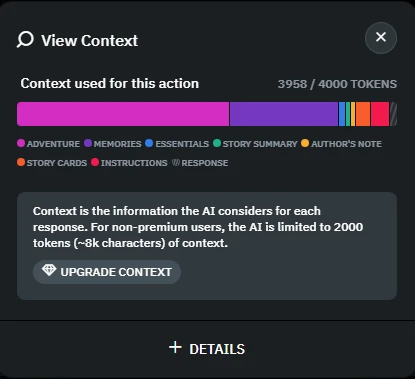
AI Dungeon offers a detailed breakdown screen for all your memory usage. It will draw upon various sources when generating your story, such as memories, AI instructions, essential story information, author’s notes, story cards and any customized scripts you use. While it is complicated and takes some learning, it is highly powerful and able to create a satisfying, immersive experience when used to its potential.
Sol: A Homecoming — (Sci-Fi Premade Scenario)
Dynamic Small — Amazing Free Tier Performance
We started our first test on the Dynamic Small model on the free tier. The story involves a character called Lord Baldwin, who is entrusted by the Gleaming Emperor of Aurora Humanity (who will henceforth be referred to as Emperor) to conquer the Sol system, the birthplace of humanity which has long been abandoned to a fractured set of surviving factions.
Lord Baldwin is not well supplied, and although he has a fleet of numerous spaceships, it is significantly underpowered for what would be needed to successfully invade the solar system. As such, he resorts to guerilla naval warfare, deciding to prioritize a weak point in the logistical network of the most hostile faction, Ceres Space Station.
Dynamic Small isn’t one model, but rather a set of models that are randomly rotated through for each message, ensuring variation between each output. This system is quite clever since it reduces the biases of any individual model from dominating the conversational output.
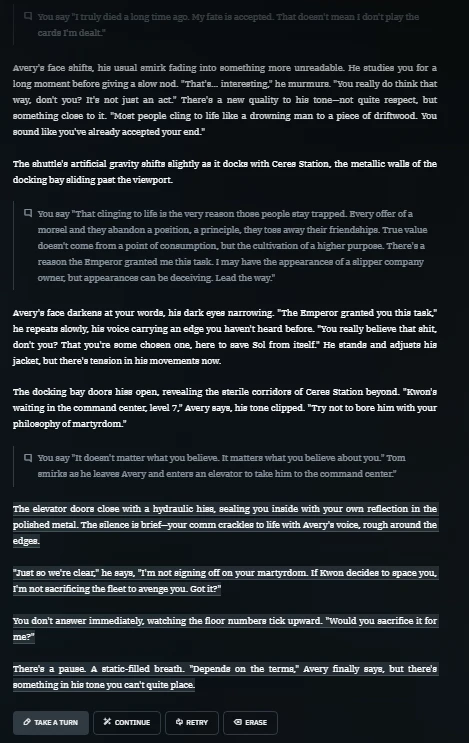
Even with the limited context on the free tier, this was a thrilling, engaging experience. Lord Baldwin was able to have deep narrative dialogues with a variety of different characters. These included Captain Avery, one of his ranking officers in the fleet, Commander Kwon, a hostile NCSF station mercenary in charge of defending Ceres Space Station, and later Commander Jackson, a jumpgate operator whose family Baldwin had murdered.
Despite variation in the types of scenes; from tense negotiations in dialogue, all the way to action scenes involving space naval warfare with full fleet engagements, the system was able to handle it well, gathering the best details and incorporating them fluidly into them.
Mistakes were quite rare. One example we ran into was that the Emperor and Captain Avery were mistaken for a different character named the Voievod. When they were noticed, it could easily be traced back through the memory editor and fixed, meaning that even on the free tier, the experience was quite coherent and exciting.
One downside on the free tier is that the context limits are quite strict; longer, complex adventures will ultimately be able to draw upon less and less relevant memories and will need an upgrade to keep the experience at a higher quality.
Dynamic Large — Better Writing with a Memory Tradeoff
After upgrading to Legend, we continued the story on the Dynamic Large model. By this point, we were reaching the context capacity and seeing how the system reacts. Large models seem to have smaller context limits than the smaller models, but are better at generating and interpreting more complex and interweaving more details into their responses.
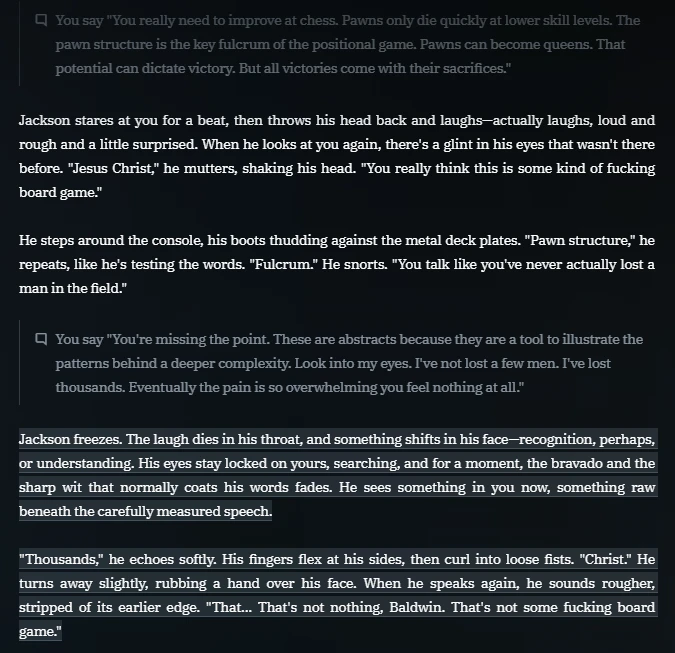
Lord Baldwin negotiates with Commander Jackson, encouraging him to work alongside his fleet despite Baldwin’s recent pillage of the Ceres Station, where much of Jackson’s family resided. Jackson gave thoughtful responses, both understanding Baldwin’s decisions in choosing his course of action while simultaneously challenging them, as well as questioning Baldwin’s loyalty to the Emperor given the actions he has been forced to take.
Unfortunately, due to the reduced context limit, the exact situation at Ceres Station was not picked up during memory selection, and while Jackson still responded well, it would have been great if the details of the battle could have been incorporated into the story.
We stuck with the Dynamic models in this test. The memory issue could potentially have been solved by switching to a dedicated larger model with a larger context model, but we avoided doing so to reduce specific model bias in this evaluation. Specific models were instead tested in the next scenario.
We noticed that while it was possible to manage the memory for recent messages, if we tabbed away to a different screen, the memory management was no longer viewable when we came back, meaning that if you want to profile these details, it is best done at the time of use.
Lost in the Ruza Archipelago - Pirate Adventure
Muse (Free) — Flowery Narrative
For our second test, we tried the Muse model on the free tier. Muse has a 4k token context window on the free tier, unlike the usual 2k on other free options.
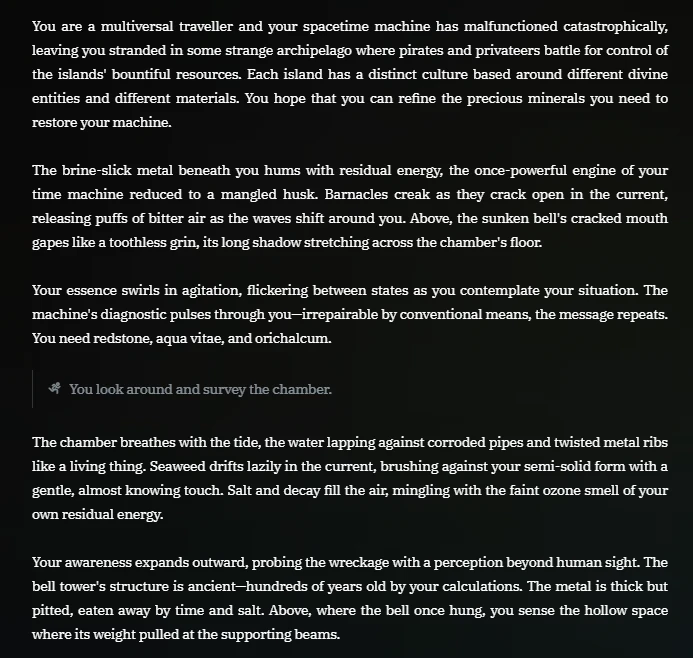
The story we crafted involved a multiversal time traveller being stranded in an Archipelago world after their timespace machine breaks down. The goal of the adventurer is to collect three resources to return to their own world.
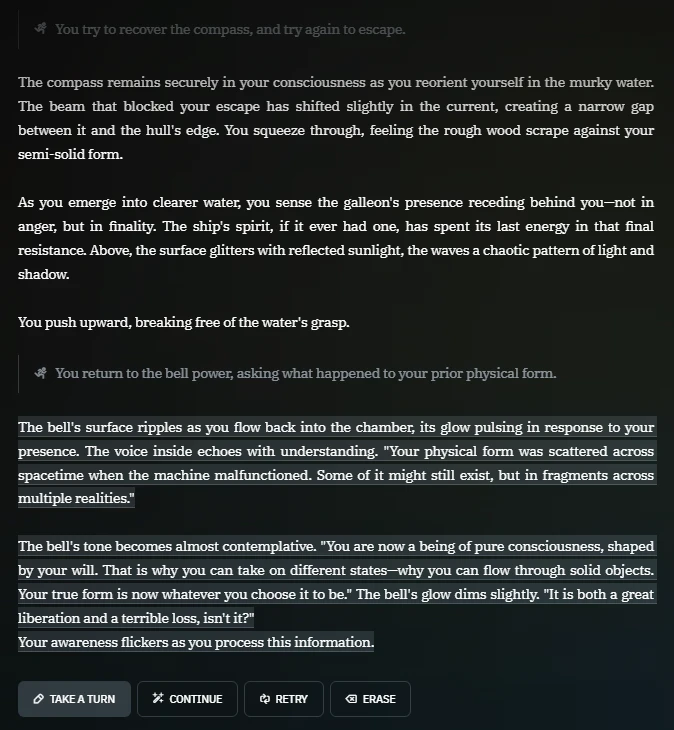
This model handled our custom scenario decently; using some of our created story cards and tags to create a philosophical interaction, with our character being a disembodied spirit after the destruction of their machine, communicating with another spirit trapped in the form of a bell tower.
The model rationalized the scenario well, with the first encounter it generated involving finding a special compass in the wreckage of a drowned galleon, fitting the themes we set out and creating an exciting twist as the galleon comes to life, attempting to drown the player character.
Writing quality was decent, although at times the scenario seemed to prioritize flowery, imprecise language over giving the player a more guided, actionable course to continue the adventure.
Scripting — An Amazing Feature for Advanced Users
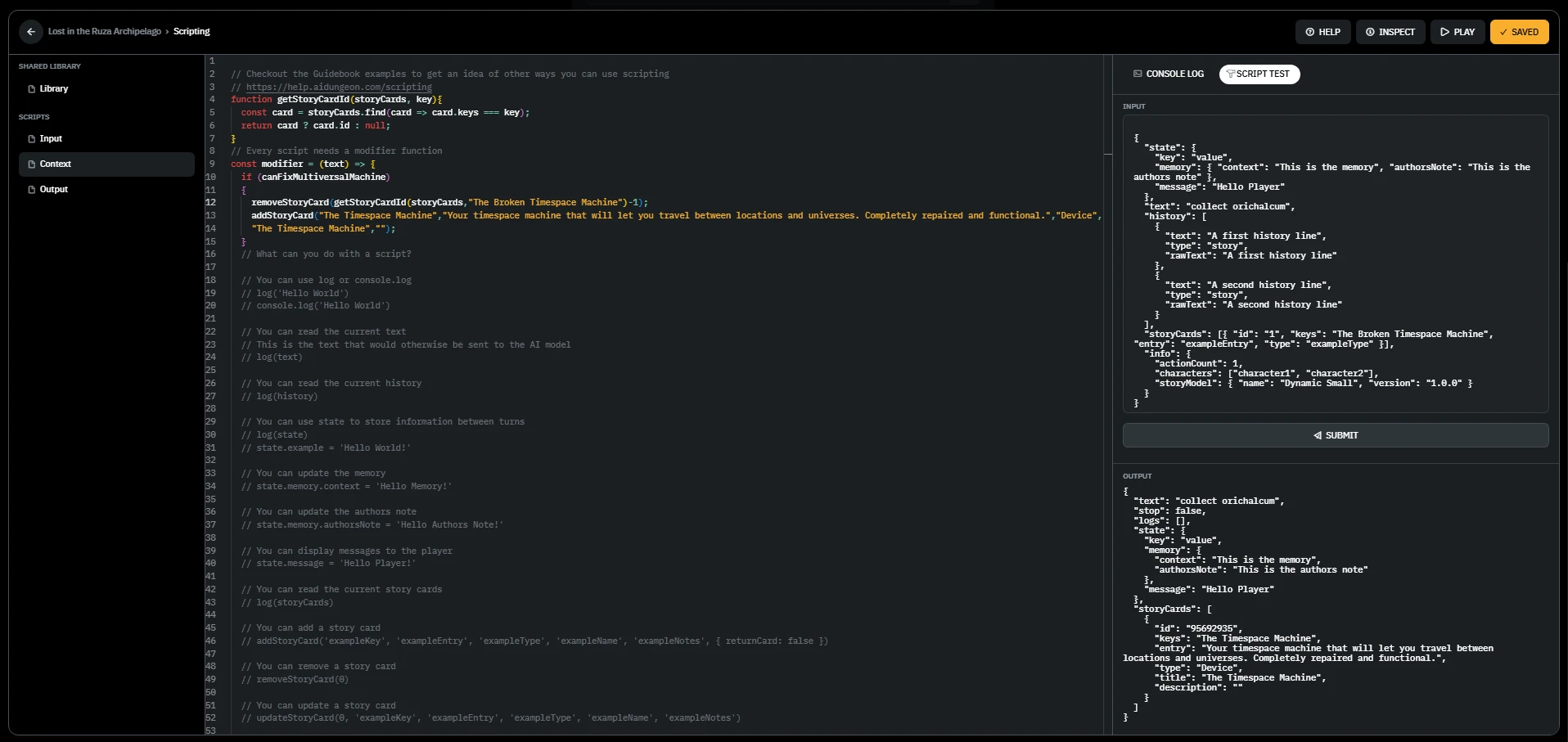
After trying the free tier, we tried the scripting feature offered by the platform. Scripting is a special feature that allows you to use Javascript to modify the setup of the prompts sent to the model prior to receipt. The tabs are split into four sections:
- Library — Creating common functions to use across the various main scripts.
- Input — Modifying the prompt based on what the user writes into the input field.
- Context — Modifying the prompt based on what lies within memory/context.
- Output — Modifying the output based on what the model returns.
For our test, we tried to add a script that would alter one of the story cards in our scenario. If the user uses some gathering words alongside the names of three resources (Redstone, Aqua Vitae, Orichalcum), the story card concerning the Broken Timespace Machine would be deleted and replaced with a story card representing the fixed Timespace Machine.
This worked magically, allowing the scenario’s core premise to be handled by the AI without allowing the user to cheat, since the prior story card would disallow the user from repairing the machine at all.
One issue was the website’s provided editor wasn’t particularly good, failing to place the caret correctly during editing, and struggling with long lines of text. However, it is possible to edit off-site with a real code editor and just paste it in — but that feels more unwieldy than it needs to be.
One popular community script we recommend is Auto Cards by LewdLeah. Auto Cards automatically generates story cards to add to your story as you play, allowing you to manage your long term memory through the story card system rather than relying purely on the default memory management platform. This flexibly lets you handle memory management when you need to, while still being mostly hands-off and automated.
Muse (Legend) — Untapped Potential
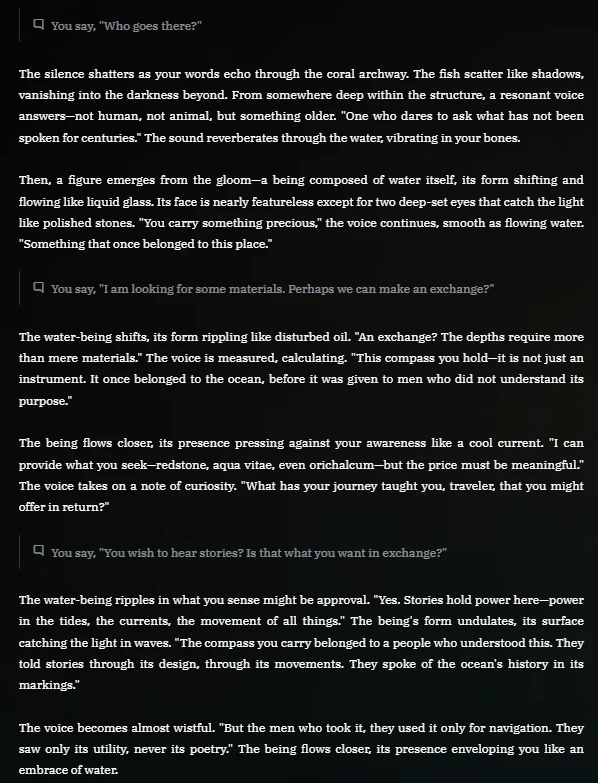
We continued the search for the resources, assuming the form of a Flowkin creature after the bell tower teaches us how to assume a corporeal form. The compass we collected earlier in the adventure points us to an island that we can begin our search on.
While the context window for Muse was large and it used any memory it felt was relevant, the actual application of those memories seemed to be minor at best.
All three resources ended up being gatherable from a singular location, guarded by a creature that gave the player all the answers. This was narratively disappointing, and it felt like what was set up to be a longer adventure was cut short. Instructions on the custom scenario could definitely have contributed to producing a better experience.
The Muse model seemed to favor a better writing style rather than a good narrative, just like on the lower tier, and the greater context didn’t seem to help it in this regard, showing how the choice of model can significantly impact your experience.
We do note community members suggested Wayfarer may have operated better for the type of adventure being run, but for newcomers like us, that wasn’t made apparent enough.
UX and Controls
The interface for AI Dungeon is clean, giving focus to the narrative window and chat below. On the top left, one can add players into your game for multiplayer. On the top right, you can change your chosen model, alter the scenario, and go back and forth through the history to alter your position in the story and rollback.
Clicking on a message allows you to edit it, view context about it (provided you haven’t left the page in the meantime, as we noted above), and also report bugs.
When inputting a message, you are given options to write a continuation, ask the AI to generate a continuation, regenerate the last message, or erase the last round.
Hotkeys (such as Ctrl+Z) can also be used to alter the history of your actions.
One thing that is particularly unusual — and a little frustrating — is the way the player turn is conducted. You have four options:
- Do: Formats your message as ‘You X’. This is generated in two parts; the player action, and the narrative response.
- Say: Formats your message as ‘You say “X”’. This is generated in two parts; the player action, and the narrative response.
- Story: Doesn’t format your message and adds it to the narrative response.
- See: Generates an image based on your input. The outputs weren’t very good.
Although this is documented in the user guide, this aspect of the interface felt clumsy. You can’t rely on using “story” for everything, because you will lose the clarity of the action sections breaking apart the text wall; in other words, the whole narrative will blend together.
Also, the “do” and “say” automation will not create syntactically correct sentences unless you supply input in a format it expects, meaning you have to get used to it.
These features felt unnecessary at best and unwieldy at worst, and didn’t really improve our experience.
Creating a Scenario
Scenario creation is the meat of the AI Dungeon experience.
First, you’re given a few templates to select, such as horror or fantasy. You can use these to influence the automatic generators used in future steps.
Next, you set the title, basic description and tags in the Details tab. These don’t influence the prompt/scenario, they’re just used to improve searchability by users.
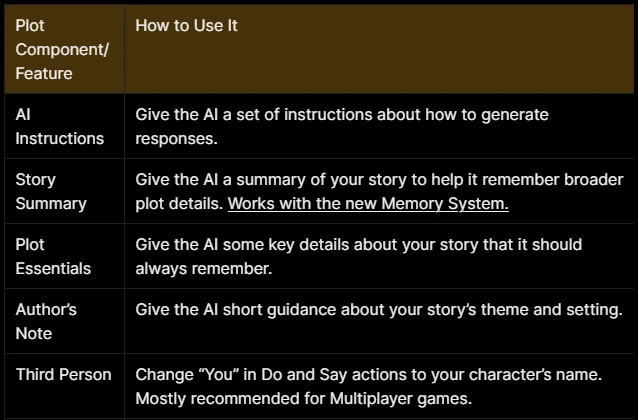
The scenario is constructed in the Plot tab. Plot is created by adding text blocks called “plot components”. Certain components influence the AI in a specific way, mostly giving overall structure rather than the specific pieces relevant to the story.
This table from the documentation breaks it down in a simple manner:
Finally, the last thing to add are story cards. Story cards allow you to create reusable blocks that are used as context by the AI. Story cards by default can be categorized as characters, classes, species, locations, factions. You are also given the ability to create your own categories. For instance, in our Ruza scenario, we used “materials” and “devices”. Story cards are selectively chosen and added to context in a similar way to how memories are also added by the system.
This worked really well, and dynamically enabling/disabling them was a really powerful tool to control the story, especially when combined with scripts. The system is really well designed and when you fully make use of all the tools available, you’ll be able to create a memorable experience.

Trust, Privacy, and Data
You can read the Latitude privacy policy on their website.
To briefly summarize, basic contact details are collected to register your account. The third parties that may access this information include payment processors, analytics vendors, and law enforcement.
Your unpublished content is collected to enable the use of the service, but it is never read or modified by the Latitude team by default, and not sent to third parties. You can give permission for technical support to help you with the service.
Latitude generally does not train on your data unless you specifically opt in to “improve the AI”.
Between 2020 and 2022, there were some data breaches on the platform, which Latitude responded to with public statements. No public incidents have occurred since then.
Published content can be accessed by anyone. Only adults over 18 are permitted by the terms of service.
User-chosen age ratings are also provided for scenarios, with additional AI safety settings for the user. For instance, a user can set their AI Safety setting to “Safe”, and even scenarios rated “Mature” will be prevented from generating sexual, hateful, horrifying or violent content.
Pricing
AI Dungeon is priced in three different ways; using a subscription system and two currencies: credits and scales.
Subscriptions
The regular subscriptions have many benefits as you progress through the tiers:
- More models, and existing models you already had access to gain increased context limits
- More image generators
- More generated memories
- More monthly credits
Subscriptions can be purchased in units of six or twelve months for a discount.
For instance, the cheapest paid tier is Champion, with a starting price of $14.99/month if taking the monthly option, or $11.67/month for a bulk purchase of 12 months.
In our experience, the best value is Legend, giving an adequate context for most regular users, 200 stored memories and 1650 monthly credits.
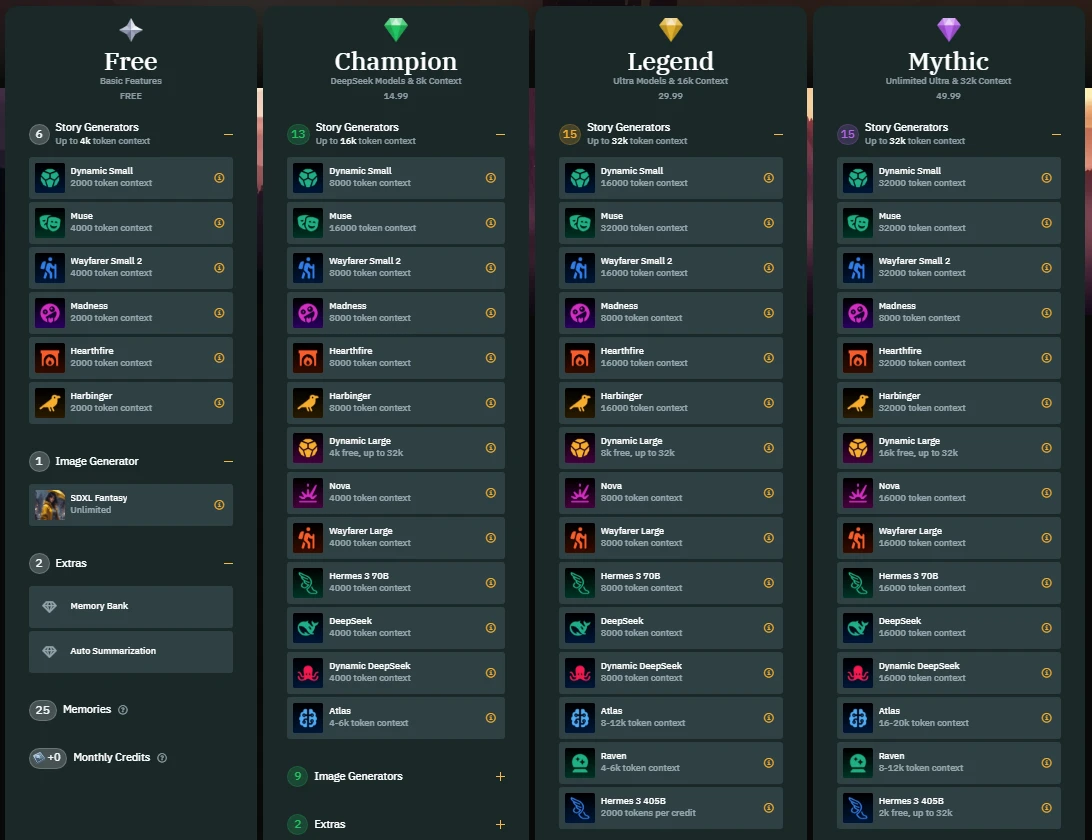
Brief Tier Overview
- Free: Doesn’t cost anything, but is throttled without scales and only has a small handful of models.
Champion:- Improved context, great for those starting out with using the platform. It has more models, and will have a reasonable number of memories saved, but has limited context. - Legend: Efficient, middle-tier option with access to all models and a comfortable context limit. Probably the best option for most users.
- Mythic: Pricier tier, but has access to all models and large context limits. Great for enthusiasts.
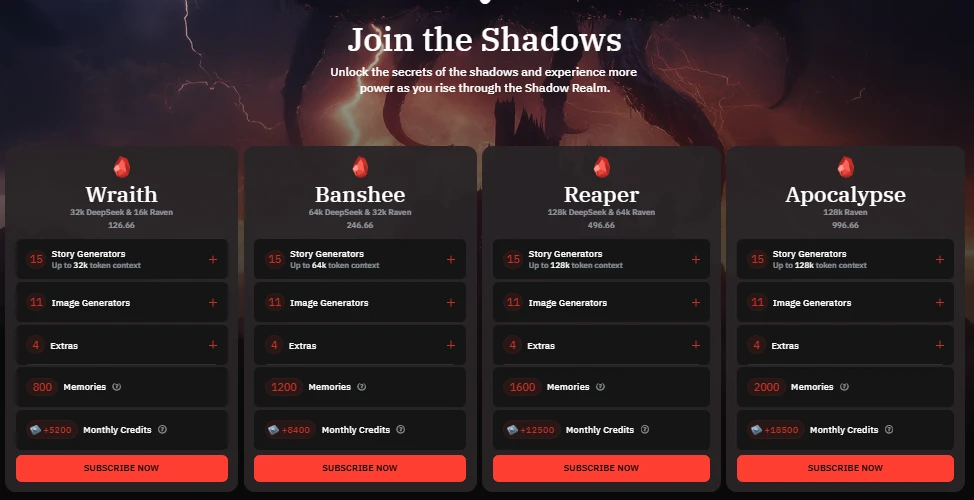
For hardcore enthusiasts, special subscriptions called Shadow Tiers exist. These have a lot of special benefits, including the largest contexts, special Discord access, massive memory storage and can create clans (a way of conferring benefits to other members, great for multiplayer).
Credits
Credits can be spent on generating images, but also for increasing context length for certain select models when touching the model settings.
Scales
Scales can be used to temporarily boost the speed and performance of the free models. They’re accumulated by daily logins, and can also be used to send tips to scenario creators. Latitude plans to use this currency for more purposes in the future.
User Sentiment
Latitude regularly holds a community review. The most recent at time of print is the February 2026 review.
Here are some highlights:
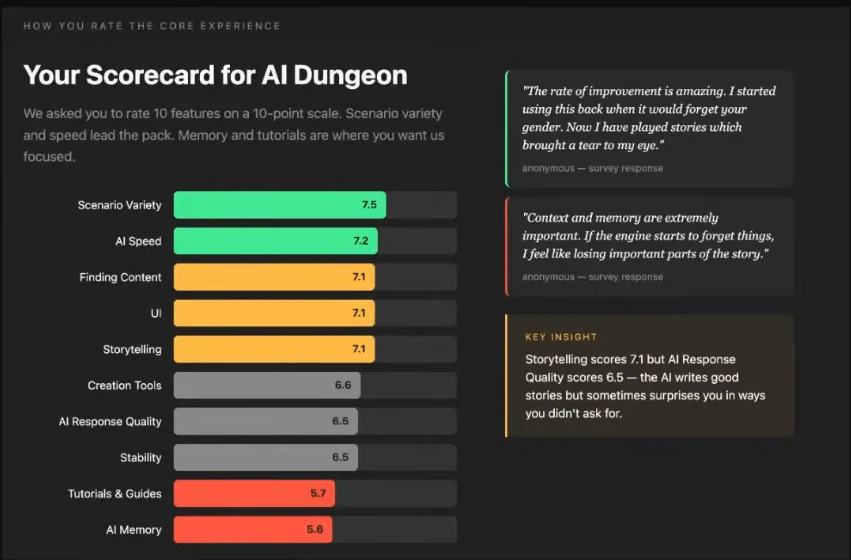
AI Dungeon user scorecard.
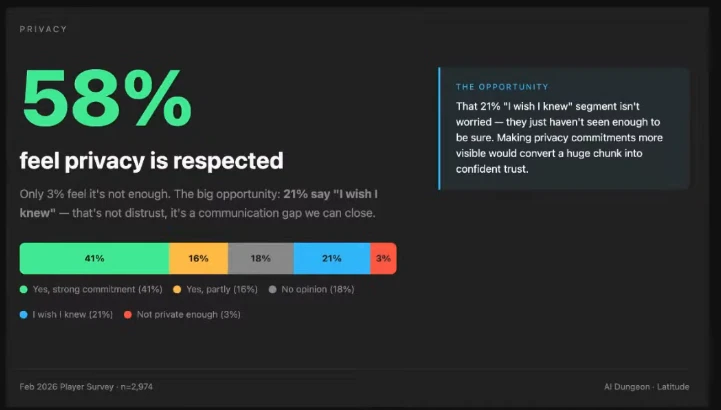
58% of users think Latitude does a good job with privacy.
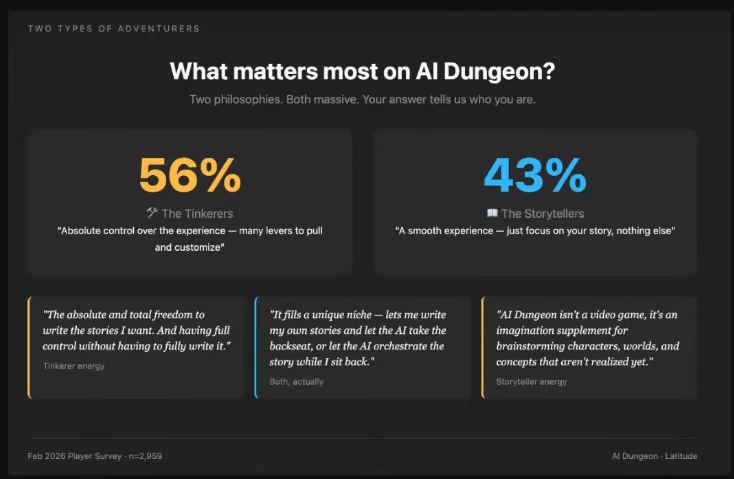
What matters most to AI Dungeon users?
There is a community Discord which is one of the most active ones we’ve seen. The community is well-structured — although you will need to customize your channel experience because of the sheer number of channels.
Pros and Cons
Pros
- Deep, flexible scenario creation system with story cards, plot components, and a custom classification system.
- Large library of scenarios across all genres.
- Free tier models on AI Dungeon have great output.
- Good memory management for paid users with a dedicated interface for profiling how context is assembled
- Fast response times across all models (one to five seconds)
- Multiplayer support for cooperative roleplaying
- Powerful Javascript scripting lets advanced users add game mechanics or advanced memory management into their scenarios.
Cons
- Scenario creation has a steep learning curve.
- The Do/Say/Story/See input system feels clumsy and requires learning specific formatting expectations.
- Memory viewer becomes unavailable if you navigate away from the current screen
- The built-in script editor is buggy.
- Some models may be unsuitable for chosen scenarios.
- Image generation outputs are poor.
- Free tier is throttled via context, memory and speed controls.
Alternatives
AI Dungeon is great at narrative scenarios, and it has a lot of great features, but can take some getting used to. If you are looking for alternatives, consider these options:
- Voyage: Currently in beta, Latitude’s next system will be tuned for playing statistics-based roleplaying games in an AI platform.
- Character AI: Character AI is a safe-content platform that handles roleplaying in a one-to-one style, for when you just want to interact with a character focus.
- Friends & Fables: Friends & Fables is an AI tabletop roleplaying platform great for traditional gamified experiences.
- DreamGen: Focused on deep roleplaying and creating stories with depth. Excellent for users who are ready to obsess over world-building and character development, as well as handling multi-character scenarios.
FAQ
Are AI Dungeon chats private?
AI Dungeon chats are handled with strong privacy protections as outlined in their privacy policy. Scenarios are private unless explicitly published.
Is AI Dungeon free?
Yes, AI Dungeon offers a free tier, however the paid options offer many benefits such as improved memory and context limits, a greater selection of models and also
Where can I download the AI Dungeon app?
AI Dungeon offers a mobile app for both Android and iOS.
Does AI Dungeon allow NSFW content?
AI Dungeon allows the publishing of NSFW content, but it must be labeled with a “Mature rating”. Public scenarios are moderated to ensure a suitable rating is chosen, and automation tools also assist in keeping the service safe. Child exploitation, even fictional, is strictly prohibited.
How can I delete my AI Dungeon account?
You can delete your account on the settings page. Be warned that deleting your account will render it unrecoverable. Any scenarios that you had published will also be deleted. The timeline for deletion is within thirty days.
How We Tested
Test dates: Primary tests were conducted between 2026-02-23 to 2026-03-08 for a few hours on various days. We also implemented our own scripts and scenarios to test the advanced features.
Platform: Web (Chrome on Windows)
Plans tested: Free tier, Legend free trial.
We tested AI Dungeon over approximately 12 hours, plus spent 3 hours scripting:
- Interacted with two scenarios, an existing user generated scenario called Sol: A Homecoming by Shaved Duck — 200 messages. We also generated a custom scenario called Lost in the Ruza Archipelago - 100 messages. 50% were conducted on a free account, and 50% were conducted on a Legend tier account.
- Conducted memory retention testing with planted details and recall checks.
- Tested image generation through the “See” feature.
- Tested steerability by attempting to redirect conversations.
- Tested edits and deletions to check alternative generations and how the memory system was handled.
- Read through memory profiles and debug logs to evaluate deeper systems.
- Reviewed 50+ user reviews across app stores. Browsed Reddit and Discord across the testing period to gauge user activity and sentiment. Community engagement is strong, and the Latitude team regularly communicates their updates.
- We did not test: Multiplayer
Last Updated: March 14, 2026